101,000 miles


 Buy Now
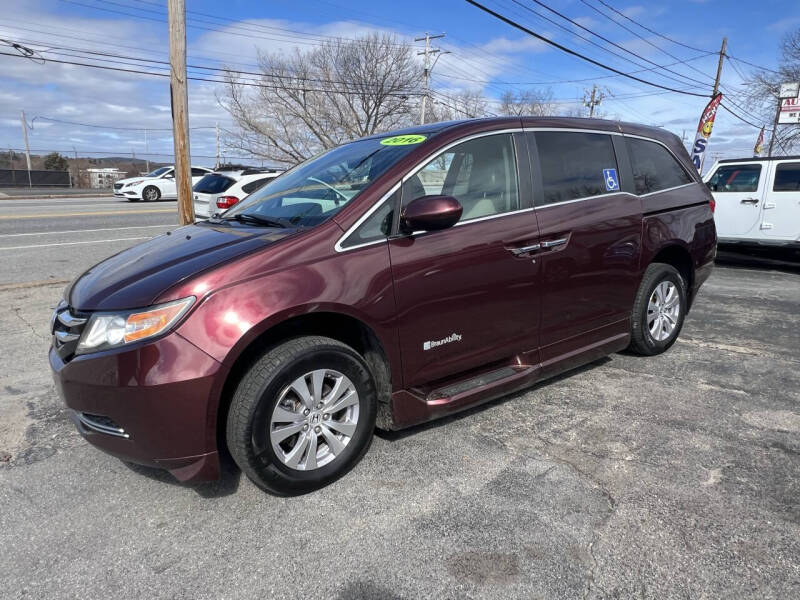
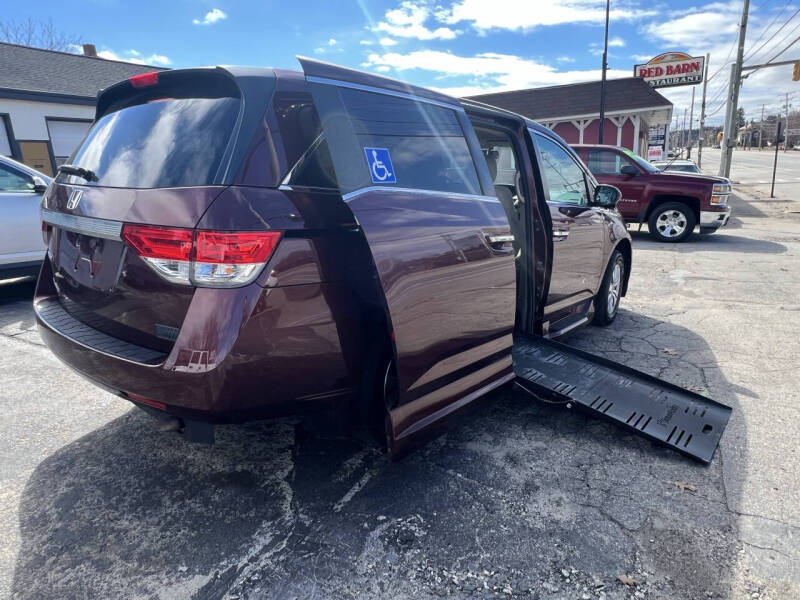
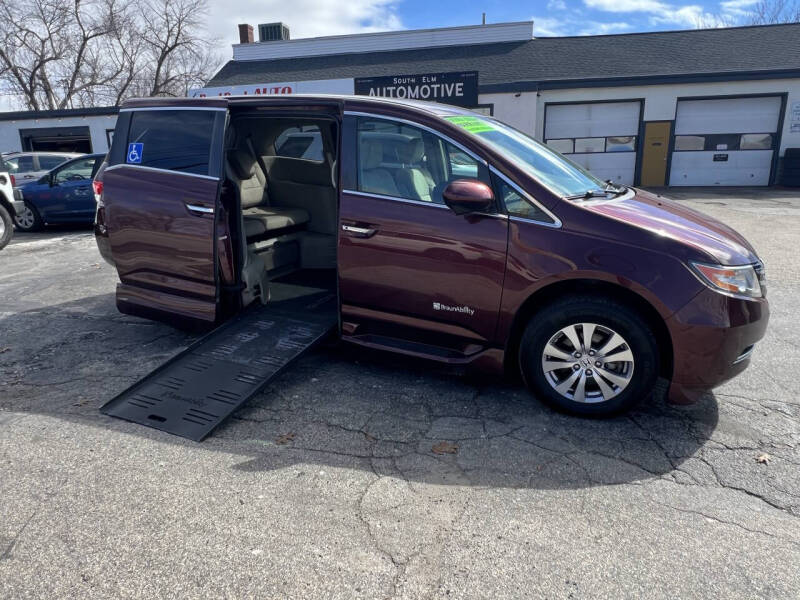
2016 Honda Odyssey EX handicap wheelchair accessible mini van with ramp and lots of customizable adaptable equipment - please see photos
This 2016 Honda Odyssey features a BraunAbility wheelchair-accessible conversion paired with an advanced EMC AEVIT (Advanced Electronic Vehicle Interface Technology) adaptive driving system and a custom Crescent Industries control panel. These electronics enable independent operation for drivers with significant mobility limitations (e.g., limited or no use of legs/hands in standard ways).
Here's a breakdown of the main electronics and their functions, based on the images and standard setups for these systems:
1. BraunAbility Conversion Controls (Power Sliding Door, Ramp, and Kneeling)
Power sliding door and infloor (or fold-out) ramp: Buttons on the driver's door panel (e.g., "CLOSE 1&2 OPEN", "CLOSE OPEN") and possibly remote key fob or overhead switches operate the side door and ramp deployment. One-touch activation opens the door, lowers the ramp, and kneels the rear suspension for a gentle slope.
Kneeling system: Lowers the rear of the van to reduce ramp angle. Often tied to the same open/close controls.
Purpose: Allows easy wheelchair entry/exit as driver or passenger. Manual overrides exist (e.g., rocker switches) for emergencies.
2. EMC AEVIT Adaptive Driving System (The core high-tech setup)
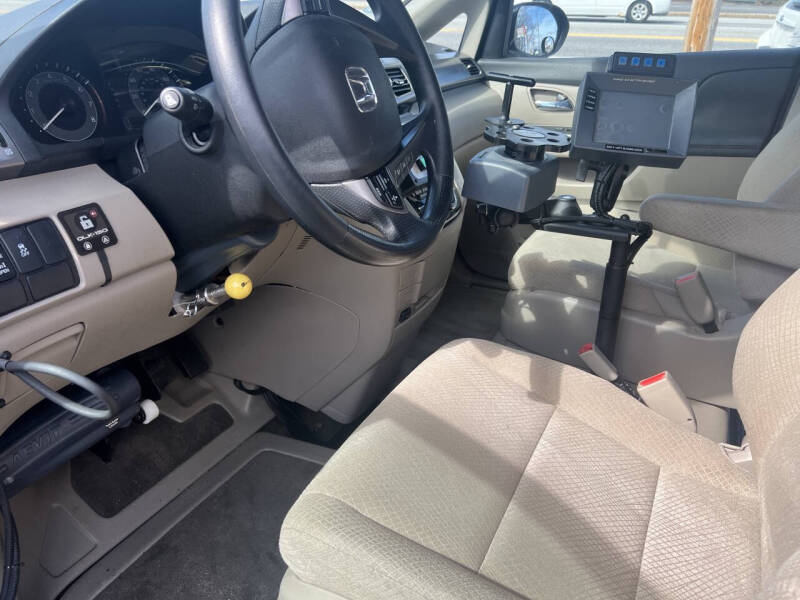
This is a drive-by-wire system that replaces or augments standard controls with electronic inputs for people who can't use factory pedals/steering easily. It uses servomotors connected to the gas, brake, and steering, plus a touchscreen for secondary functions.
Control Head / Display (black unit with screen and buttons 1-4):
The touchscreen shows icons for secondary controls (ignition, lights, turn signals, wipers, horn, cruise, windows, locks, etc.).
Buttons 1-4 are programmable auxiliaries, labeled in your photo: 1 AEVT, 2 SPARE, 3 CHAIR, 4 RAMP. These likely activate specific functions like AEVIT modes, wheelchair securement ("CHAIR"), ramp/door overrides, or spares.
"CHANGE AUX BATTERY" reminder and "AUX 4 LEFT SLIDING DOOR" indicate monitoring and door/ramp integration.
Input Devices (joysticks, levers, or wheel-mounted controls, often on the door or floor mount): These send signals to servomotors. Common setups include a lever/joystick for gas/brake and another for steering (or a combined system). The door-mounted unit in photos is part of this.
Servomotors: Under the dash—one for pedals (accelerate/brake), one for steering wheel rotation.
Disengage Feature: Can be switched off in ~15 seconds for able-bodied drivers.
Primary functions (gas, brake, steering) are controlled via low-effort inputs tailored to the user's abilities. Secondary functions (everything else) go through the touchscreen or linked switches.
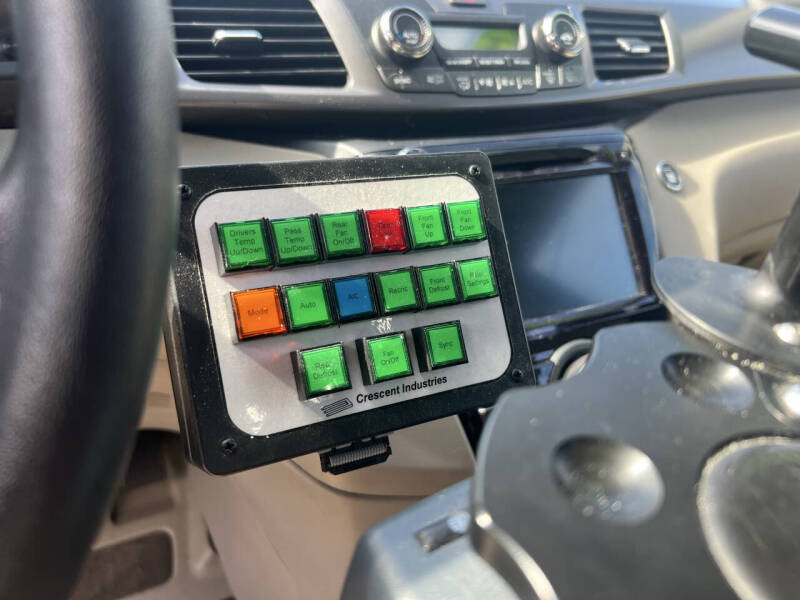
3. Crescent Industries Custom Switch Panel (Lighted HVAC and accessory console)
This custom panel (often green/red/orange buttons) expands accessible controls for climate and other features, integrated with or alongside AEVIT.
HVAC Controls:
Driver/Passenger Temp Up/Down
Rear Fan On/Off
Front Fan Up/Down
A/C, Auto, Mode, Defrost, Sync, etc.
Other functions: Rear defrost, front/rear settings. The panel uses vehicle-specific relays for reliable operation by someone with limited reach/mobility.
4. Other Adaptive Electronics Visible
Steering spinner/knob (yellow ball on the wheel): Helps with one-handed or limited-grip steering.
Floor-mounted controls (e.g., hand brake or emergency release with red/yellow handle): For parking brake or quick releases.
Power door/window overrides and auxiliary wiring: Visible in door panels for integration with adaptive systems.
Wheelchair securement/Chair controls: Likely tied to AEVIT aux buttons or separate (e.g., "CHAIR" function for locking a wheelchair in the driver position).
How It All Works Together
The driver uses AEVIT inputs (lever/joystick + touchscreen/switches) for full vehicle operation.

| Monday | 9:00 am - 6:00 pm |
| Tuesday | 9:00 am - 6:00 pm |
| Wednesday | 9:00 am - 6:00 pm |
| Thursday | 9:00 am - 6:00 pm |
| Friday | 9:00 am - 6:00 pm |
| Saturday | 9:00 am - 4:00 pm |
| Sunday | Closed |

Digitally connect with dealers to answer questions about the virtual buying process, available inventory, financing options and more!

Easily find local dealerships offering online loan applications for simple, fast and contactless auto financing.

Start or even fully complete sales paperwork online. It’s a safe and easy process that makes buying seamless.
Unless prohibited by applicable rules or regulations.
This vehicle may have an open safety recall. Head to the National Highway Traffic Safety Administration (NHTSA) website to perform a quick search.
Some vehicles may be subject to manufacturer safety recalls. See if there are any open safety recalls for this vehicle. This does not include non-safety recalls. Recently announced safety recalls may not yet be posted and there may be a delay between the time a repair is made and before it is reported or posted to the website. Before purchasing, be sure to ask the dealer for an up-to-date status on any recalls.
| Monday | 9:00 am - 6:00 pm |
| Tuesday | 9:00 am - 6:00 pm |
| Wednesday | 9:00 am - 6:00 pm |
| Thursday | 9:00 am - 6:00 pm |
| Friday | 9:00 am - 6:00 pm |
| Saturday | 9:00 am - 4:00 pm |
| Sunday | Closed |


 101,000 miles